Step 2: Creating a Timelapse Template
For detailed instructions, see the Timelapse Template Guide.
This step is where you create custom database fields for your project. The Timelapse interface uses the fields defined in the template to structure the database during the image review process. The template must be stored in the root folder of your image dataset (the project folder from Step 1: Organizing Media).
You can use the Timelapse practice image set as a basis for getting started. See Key Resources for a link to download this.
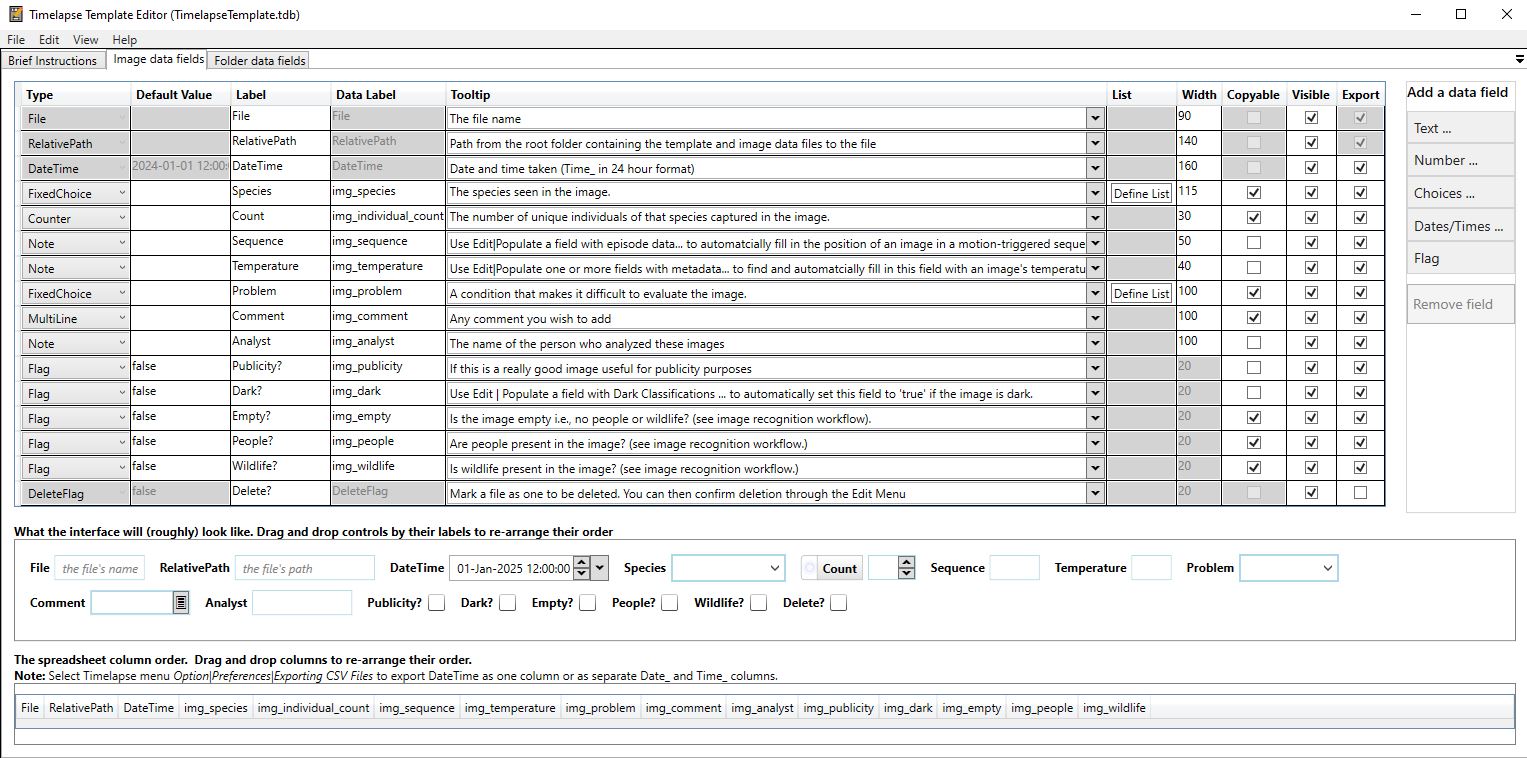 Example of a Timelapse template, using the practice image set.
How to create a Timelapse Template
-
Start the Timelapse Template Editor software. (This is the
TimelapseTemplateEditor.exefile in your Timelapse directory.) -
To create a new template: go to File → New Template, navigate to the root folder of your image dataset, and save the template with a unique name.
-
The newly created template will include the mandatory data fields required by Timelapse. You do not need to modify these.
-
Use the Add button on the right side of the table to define fields and select a data type:
- Notes: Free text
- Counts: Integers
- Flags: True/false
- Choices: Dropdown menu with predefined options
You can create whatever fields you want for your annotation project.
Your project template data is stored in a file called TimelapseTemplate.tdb. You may rename this file as long as you do not have special characters or spaces in the filename. Please make sure this file is always at the root level of your imagery set. (Timelapse will create it there when you start a new project.)
What Information Should Be Recorded Per Image?
The right set of information to record depends on what the project is for: community monitoring, a local species list, scientific publication, or some combination of these.
This section first suggests fields that Indigenous use cases often include. If you also want the annotations to be scientific-grade and publishable on a platform like GBIF, we recommend meeting GBIF's data quality requirements for occurrence datasets.
An occurrence is evidence that a species (or other taxon) was present at a particular place on a specified date. In a camera trap project, that record is created when you annotate an image in Timelapse.
Deployment metadata — where the camera was, when it was operating, and how it was set up — is covered separately in What information should be recorded? in the camera trap deployment guide.
Suggested Fields for Indigenous Use Cases
Indigenous community organizations often include fields such as:
| Field | Timelapse type | What it records |
|---|---|---|
Indigenous Name | Choices or Notes | Indigenous name for the species in the image |
English Name | Choices | English name for the species in the image |
Scientific Name | Choices | Scientific name for the species in the image |
Count | Counter | Number of individuals of that species in the image |
Notes | Note | Reviewer comments |
Favorite | Flag | Mark notable images |
You don't have to use scientific names for your species dropdown if you don't want to. You can use Indigenous names instead, and later join those with scientific names (if so desired).
GBIF Occurrence Fields
If you want the information to be scientifically useful and publishable on GBIF, include the Darwin Core terms below from GBIF's data quality requirements for occurrence datasets. GBIF will not accept or index occurrence records that are missing the four required terms. The strongly recommended terms make the data much more useful, by helping GBIF match names correctly and by making the records usable for mapping.
You do not have to create a custom Timelapse field for every term:
- Timelapse already extracts date and time from image metadata.
- Location (coordinates, country, geodetic datum, coordinate uncertainty in meters) is usually recorded when the camera is deployed (see Step 2: What information should be recorded? in the camera trap deployment guide), and can be stored as folder-level metadata or maintained separately as a spreadsheet.
- Some terms, such as
occurrenceIDandbasisOfRecord, can be generated or filled in when you export.
You can name the Timelapse fields more plainly (for example Scientific Name instead of scientificName) and map them to Darwin Core later.
Fields marked Required are required by GBIF for occurrence datasets. Strongly recommended fields are optional in the standard but greatly increase how useful the published data can be.
| Field | Status | Timelapse type | What it records |
|---|---|---|---|
occurrenceID | Required | Notes, or generated at export | Unique identifier for this occurrence. Must be unique at least within the dataset. Often derived from the image filename (plus species, if an image is annotated more than once). |
basisOfRecord | Required | Choices, or set at export | Type of record. For camera traps this is typically MachineObservation. |
scientificName | Required | Choices | Full scientific name of the organism, to the lowest rank possible. Common names and qualifiers such as "cf." are not accepted. |
eventDate | Required | Built-in DateTime | Date the image was taken, in ISO 8601 (YYYY-MM-DD). Timelapse already extracts this from the image. Do not include the time of day here. |
taxonRank | Strongly recommended | Choices | Rank of the scientific name, such as species, genus, or family. Helps GBIF place the name correctly. |
kingdom | Strongly recommended | Choices | Kingdom the organism belongs to, such as Animalia. Helps GBIF match names that could belong to more than one organism. |
individualCount | Strongly recommended | Counter | Number of individuals of that species in the image. For camera traps this is usually enough; GBIF also allows organismQuantity and organismQuantityType when the quantity is not a simple head count. |
If you have them, GBIF also asks you to share eventTime (Timelapse already extracts this from the image), informationWithheld, and dataGeneralizations (for example if coordinates were blurred to protect a sensitive species).
Publishing to GBIF also requires dataset-level metadata — title, description, license, contacts, and so on. That information is not recorded in Timelapse. See GBIF's data quality requirements for occurrence datasets for the full list.