CoMapeo Camera Trap Deployment
This CoMapeo category set uses the column naming conventions recommended in the GBIF Camera Trap Guide.
💾 Download the category set: camera-trap-deployment.comapeocat
Please see the CoMapeo documentation for more information on how to install the category set for your project.
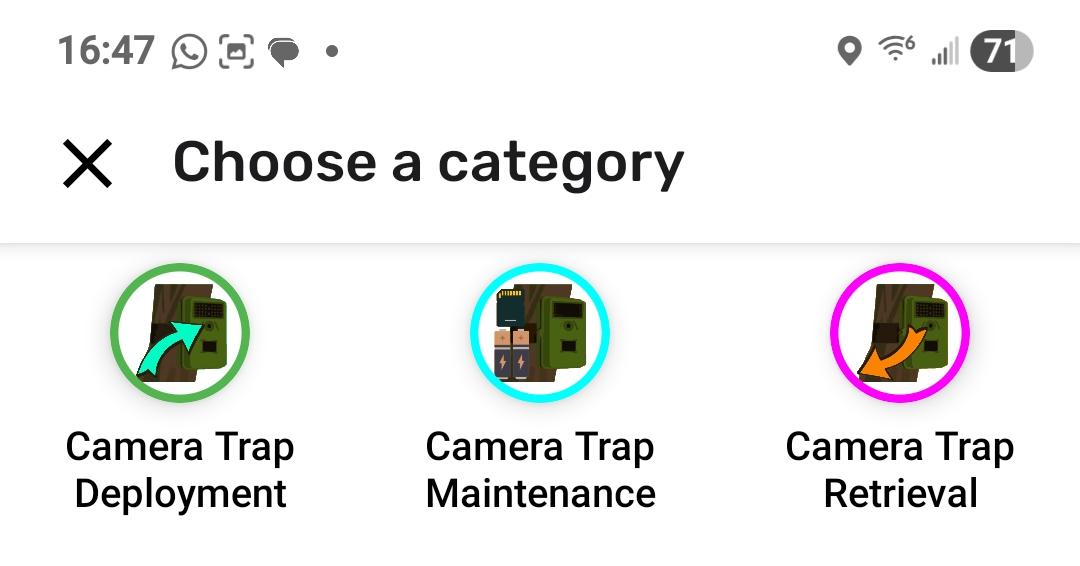
This category set has four categories:
- Camera Trap Deployment (observation)
- Camera Trap Maintenance (observation)
- Camera Trap Retrieval (observation)
- Camera Trap Path (track)
GBIF recommended fields in CoMapeo
This table shows how the GBIF recommended deployment fields are mapped to the CoMapeo elements or fields in this category set.
This information is captured using the Camera Trap Deployment category. The other categories are used for documenting camera trap maintenance, camera trap retrieval, and the path (track) to the camera.
| GBIF Property | CoMapeo Element | Field Name | Notes |
|---|---|---|---|
| Deployment ID | Field (Select One) | deployment_id | |
| Start date/time | Auto-captured | Observation timestamp at deployment, output as createdAt in ISO 8601 format | |
| End date/time | Auto-captured | Observation timestamp at retrieval, output as createdAt in ISO 8601 format | |
| Location ID | Field (Select One) | location_id | |
| Location name | Field (Text) | location_name | |
| Latitude | Auto-captured | Output as lat in decimal degrees | |
| Longitude | Auto-captured | Output as lon in decimal degrees | |
| Coordinate uncertainty | Auto-captured | Output as accuracy in meters | |
| Other location information | Field (Text) | other_location_information | |
| Camera set up by | Field (Text) | camera_set_up_by | |
| Camera ID | Field (Select One) | deployment_id | Shares field with Deployment ID |
| Camera model | Field (Text) | camera_model | |
| Camera delay | Field (Number) | camera_delay | In seconds |
| Camera height | Field (Select One) | camera_height | In meters |
| Camera depth | Field (Number) | camera_depth | In meters |
| Camera tilt | Field (Number) | camera_tilt | In degrees (0-360) |
| Camera heading | Field (Number) | camera_heading | In degrees (0-360) |
| Detection distance | Field (Number) | detection_distance | In meters |
| Timestamp issues | Field (Select One) | timestamp_issues | |
| Bait use | Field (Select One) | bait_use | |
| Habitat | Field (Text) | habitat |
CoMapeo does not provide a way to add validations for the fields in this category set. For example, for camera tilt, we cannot ensure that the value entered is between 0 and 360 degrees. Therefore, it is important to work with field staff to ensure that the values entered are correct.
Customizing the category set
You will likely want to customize this category set to meet your specific needs. To do so, git clone the conservationmetrics/gc-docs repository and modify the files in /static/comapeo/camera-trap-deployment/config.
CMI or Awana Digital can help you build a new category set if you need assistance.
In the future we can also make a Google spreadsheet available to use with CoMapeo's Category spreadsheet plugin.
Customization recommendations
deployment_id field
This field currently has 15 options, and uses a sequential numbering system (CT 1, CT 2, CT 3, etc.). If you need more, or want to change the numbering system, you can modify the options array.
location_id field
This field currently has 5 placeholder options (Location 1–5). You should replace these with the actual location IDs used in your study area. Add or remove options as needed to match your deployment sites.
You could use village or community areas as the options for this field.
habitat field
This field is currently a free-text field. If the habitats in your study area are well-known and limited in number, consider changing this to a selectOne field with predefined habitat types as options. This improves data consistency across deployments.
sd_card_id_inserted and sd_card_id_retrieved fields
These fields are used to collect the SD card ID for the camera deployment and retrieval. The sd_card_id_inserted field is used to collect the SD card ID that was inserted into the camera, and the sd_card_id_retrieved field is used to collect the SD card ID that was retrieved from the camera.
Similar to the deployment_id field, this field currently has 15 options, and uses a sequential numbering system (SD Card 1, SD Card 2, SD Card 3, etc.). If you need more, or want to change the numbering system, you can modify the options array. They should be the same options in both fields.
camera_set_up_by field
This field is used to collect the name of the person who is deploying, maintaining, or retrieving the camera.
It is current a simple text field. If you know the names of everyone who will be deploying, maintaining, or retrieving the camera, you can change this to a selectOne field with the options being the names of the people.
camera_height field
This field is used to collect the height at which the camera is mounted. The options are 0.5, 0.75, 1, 1.25, 1.5, 1.75, 2 meters. If you need more, or want to change the options, you can modify the options array, or make this a number field.
check_settings field
This field is used as means to validate the settings of the camera. It is not meant to actually collect any data.
The options are:
- Date - today's date
- Time - what time is it
- Mode - Trail
- Capture Delay - 1s
- PicSize - High16MP
- MultiShot - RPF2Shot
- 00PM Cap Start
- 00PM Cap End
- Smart IR - On
- Night Exp - Fast Motion
- Temp Unit - C
- Info Strip - On
- SD Management - Off
- Motion Detect - Normal
- Battery Type - NiMH
- Language - English
- Name - As written inside the door
If you need more, or want to change the options, you can modify the options array.
Metadata
The metadata.json file contains the name and version of the category set. You can modify this to reflect your own category set name and version.
{
  "name": "Camera Trap Deployment (GBIF)",
  "version": "1.0.0"
}
Add a translation
Currently, this category set is translated into the following languages:
- Spanish (
es) - French (
fr) - Dutch (
nl) - Indonesian (
id) - Portuguese (
pt) - Swahili (
sw) - Thai (
th)
To add your own translations, add a JSON file with the right ISO code in the messages directory and add the translations to the file, or let us know if you would prefer a spreadsheet to work with.
We welcome translations for other languages! If you are interested in contributing a translation, please contact us at guardianconnector@conservationmetrics.com.
Building a new camera traps category set
Once you have customized the category set, you can build a new category set using the comapeocat command line tool. This requires you to have Node Package Manager (npm) installed.
npm install -g comapeocat

# Run this in this directory after forking: https://github.com/ConservationMetrics/gc-docs/tree/main/static/comapeo/
npx comapeocat build ./config --output camera-trap-deployment.comapeocat
Please see the comapeocat documentation for more information.